Integration · Infor CloudSuite Distribution
AI quote and order automation for Infor CloudSuite Distribution (SX.e)
ERP Agent reads the customer’s request from email, PDF or Excel, identifies the right products in Infor CloudSuite Distribution, prices every line for that customer through Distribution SX.e and creates a quote order or stock order once your rep has approved it. We set up the connection for your company during onboarding, and you can start with a catalogue file the same week.
What ERP Agent reads from CloudSuite Distribution
The connection runs through Infor’s SX.API calls, reached through the API Gateway in Infor OS (ION API), and signs in with OAuth 2.0. ERP Agent works from your product records as they are today.
| Data in CloudSuite Distribution | SX.API call or record | What ERP Agent does with it |
|---|---|---|
| Products and warehouse products | Product Setup and Product Warehouse Product Setup records | Identifies the right product for every request line from the customer’s own wording, and checks each product exists before anything is written |
| Units | The units set up on each product | Puts each line in a unit Distribution SX.e knows |
| Customer product numbers | Product Extended Product Cross Reference Setup records | A line written with the customer’s own product number lands on your product, as it would in Sales Order Entry |
| Customers and ship-tos | Customer Setup and Customer Ship To Setup records; ship-tos through sxapiARGetShipToList | Finds the customer behind the request, warns the rep when none matches and flags a delivery address that matches none of the customer’s ship-tos |
| Customer pricing | sxapiOEPricing and sxapiOEPricingMultiple | Brings in the price Distribution SX.e returns for that customer, product and quantity, so the rep reviews the draft with real prices |
Your products, pricing and customer records stay exactly as they are: the agent reads them and never changes them.
What ERP Agent writes to CloudSuite Distribution
One call in two order types, sent only after a rep has approved the draft.
| Order | SX.API call | What is written |
|---|---|---|
| Quote order (QU) | sxapiOEFullOrderMntV6 | The order header with the customer and the customer’s reference, and every approved line with product, quantity and unit, priced by Distribution SX.e for that customer |
| Stock order (SO) | sxapiOEFullOrderMntV6 | The same lines, plus the customer’s PO number and the ship-to taken from the request |
Both are ordinary orders your team opens and maintains in Sales Order Entry like any other. When a customer accepts a quote, your team converts the quote order to a stock order as usual.
Why CloudSuite Distribution teams add an AI quote agent
The hard part of a quote is reading “500 x 3/8-16 x 1-1/2 HCS gr 8 zinc” or a customer’s own product number and knowing which product that is, what this customer pays for it and which lines need a second look. According to our case study, a sales rep spends on average 4–7 minutes per line when creating quotes and orders by hand; for a 30-line enquiry, that is two to three and a half hours.
ERP Agent does that groundwork. It is the first agentic AI layer for wholesale distribution ERP systems, and on CloudSuite Distribution it works on top of the system you already run: no replacement project, no new portal for your customers. They get answers sooner, reps spend their time on judgement and selling, and new reps are productive sooner. Put a number on today’s manual work with the quote cost calculator.
The same agent runs quote automation and order entry automation on any ERP; this page covers what it does inside CloudSuite Distribution and Distribution SX.e.
How Infor CSD order and quote automation works
A request reaches the agent
Reps forward the customer’s email from Outlook to your company’s own agent mailbox, or paste it into the web app as it is and choose quote or sales order. PDF (scanned too), Excel, CSV, Word, images and forwarded emails all work. Your own systems can send requests through the REST API or the MCP server.
It finds the customer and the products
The customer is identified from the request and matched to its customer record. Abbreviations, dimensions, materials, part numbers and customer product numbers are mapped to your products, and candidates that contradict a stated size, voltage or rating class are pushed down. A request in one language finds products described in another. A line too vague to identify goes on your placeholder product with the customer’s wording kept, never a guess.
Prices come from Distribution SX.e
Each line carries the price Distribution SX.e returns for that customer, product and quantity through its pricing calls. Standard fee rows, such as packing, are added following your rules.
A rep reviews the draft
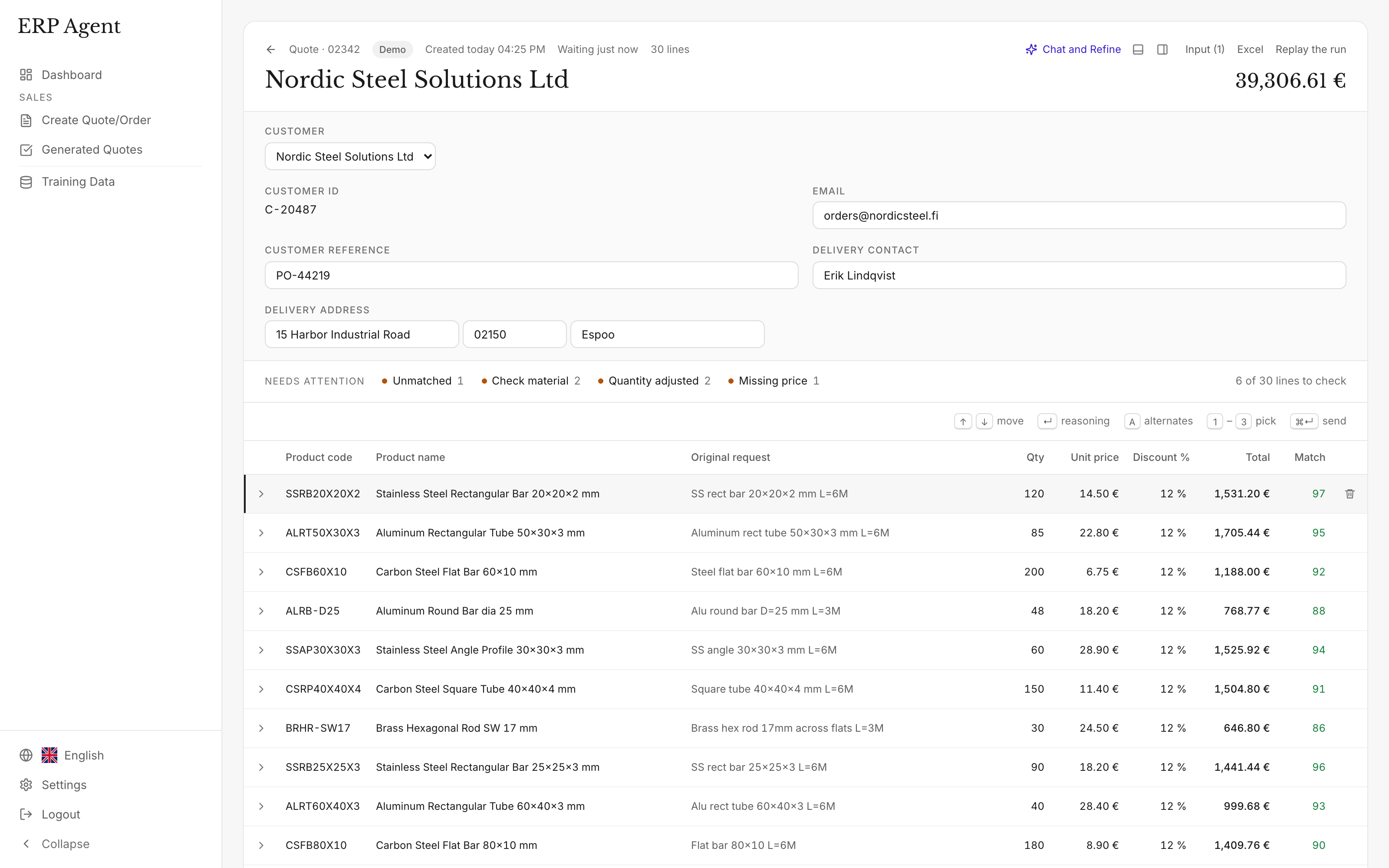
Lines appear in the table as they are matched. The rep checks the marked ones, takes an alternative where needed, makes changes in quote chat and approves.
It is created in CloudSuite Distribution
Every product is checked first, so an order never carries a product Distribution SX.e doesn’t know. A short countdown lets the rep cancel. The order then sits in Sales Order Entry as a quote order or stock order. The lines your team sends teach the agent: the next time a customer writes the same thing, it picks the same product.
Example: an emailed list becomes a quote order
A maintenance buyer at a packaging plant emails a list to a fastener and industrial distributor running CloudSuite Distribution. The rep forwards it to the agent mailbox, which is set to create quote orders.
“Need a quote on the following, ship to the Dayton plant.”
- 500 x 3/8-16 x 1-1/2 hex cap screw gr 8 zinc
- 500 x 3/8-16 nylon lock nut gr 8
- 1000 x 3/8 USS flat washer zinc
- 25 x 1/2-13 x 6 ft threaded rod B7
- 40 x cust # 77-20418
- 2 x anchors for the mezzanine posts
| Request line | Proposed product | Qty | Match | Note |
|---|---|---|---|---|
| 3/8-16 x 1-1/2 hex cap screw gr 8 zinc | Hex cap screw 3/8-16 x 1-1/2 in, Grade 8, zinc | 500 | 96 | Thread, length and grade match; Grade 5 pushed down. |
| 3/8-16 nylon lock nut gr 8 | Nylon insert lock nut 3/8-16, Grade 8, zinc | 500 | 94 | Thread and grade match. |
| 3/8 USS flat washer zinc | Flat washer 3/8 in, USS, zinc plated | 1000 | 95 | USS and SAE washers kept apart. |
| 1/2-13 x 6 ft threaded rod B7 | Threaded rod 1/2-13 x 6 ft, ASTM A193 B7, plain | 25 | 79 | Finish not stated: plain proposed, zinc plated kept as an alternative. Marked for review (under 80). |
| cust # 77-20418 | Socket head cap screw 1/4-20 x 3/4 in, alloy, black oxide | 40 | 98 | The customer’s own product number, found through the customer product cross reference. |
| anchors for the mezzanine posts | Placeholder product, wording kept | 2 | – | Too vague to identify; the rep decides. |
Illustrative example with sample products, numbers and scores. In a real draft each line also carries the customer’s price from Distribution SX.e, and the Dayton address is checked against the customer’s ship-tos.
What the rep sees before anything reaches CloudSuite Distribution
- A match score from 0 to 100. Lines under 80 are marked, so review starts where judgement is needed. How the match score works.
- Reasoning. Open a line to see why the agent chose that product.
- Alternatives. Runner-up products are kept for every line; take one instead with a click.
- Quote chat. Add or remove rows or change quantities and prices, then approve or reject each proposed edit line by line.
- Your team stays in control. The rep approves the draft before it is created in CloudSuite Distribution, and nothing reaches a customer without approval.
Security and control
- GDPR-compliant, zero data retention. ERP Agent is GDPR-compliant, and models run with zero data retention. More on security and data handling.
- Access agreed first. Before setup, we agree which data the agent needs and which systems it can access.
- An authorized app in your own API Gateway. The connection signs in with OAuth 2.0 as a Backend Service authorized app that your administrator creates in the Infor OS API Gateway, with its own service account, which carries only the access the work needs.
- A person approves. Nothing is written to CloudSuite Distribution until a rep approves the draft, and nothing reaches a customer without your team.
- Reads, never rewrites. Products, pricing and customer records are read; the agent creates quote orders and stock orders and changes nothing else.
Onboarding: what we need from you
We set up the CloudSuite Distribution connection for your company during onboarding. Your reps don’t wait for it: they start with a catalogue file the same week.
A catalogue export
An export of your product records, for example to Excel or CSV. Reps forward real requests from the first week, reviewing every draft in the web app. See starting from a catalogue file.
An authorized app
Your Infor OS administrator adds a Backend Service authorized app in the API Gateway and downloads its credentials with a service account.
An operator for the agent
The security for that service account in CloudSuite Distribution, as we agree it. We send the exact list of SX.API calls the agent uses.
Your rules and history
Which company and warehouse the agent quotes from, which placeholder product takes lines too vague to identify, which fee rows it adds, and past quotes or Outlook email history, so the agent learns how your customers write.
Live in CloudSuite Distribution
Once the connection is live, customer prices come from Distribution SX.e and approved quote orders and stock orders are created there directly.
ERP Agent in numbers
- 4–7 min
- per line to create quotes and orders by hand, according to our case study
- Over 95%
- average automation across our customers
- 3–8 min
- for the agent to prepare a typical request
- 1–3 min
- in fast mode, for requests of up to about 50 lines
CloudSuite Distribution today, any ERP tomorrow
ERP Agent integrates with Infor CloudSuite Distribution, Infor M3, NetSuite, Business Central, SAP and any other ERP or CRM. We set up the connection for your company during onboarding, and you can start with a catalogue file the same week. Group companies on different systems use the same agent and the same review screen on each. See Infor M3, NetSuite and all integrations.
ERP Agent is live with steel, HVAC and fastener distributors. What it checks on each line follows your trade: DIN and ISO codes for fastener distributors, sizes and pack quantities for industrial suppliers, cable sizes and IP ratings for electrical wholesalers.
Frequently asked questions
Does ERP Agent work with Infor CloudSuite Distribution?
Yes. ERP Agent reads products, customers and pricing from CloudSuite Distribution through Infor’s SX.API calls on the Infor OS API Gateway and creates quote orders and stock orders there after a rep approves. We set up the connection for your company during onboarding, and you can start with a catalogue file the same week.
Does it create quote orders or stock orders?
Both. In the web app the rep chooses quote or sales order for each request; emails forwarded to the agent mailbox become the order type your company has chosen. For customer purchase orders arriving by email, see purchase order to sales order automation.
Does it work with Infor Distribution SX.e on our own servers?
Yes. Distribution SX.e is the application inside CloudSuite Distribution, and the SX.API calls the agent uses are the same. With SX.e on your own servers, we agree with your IT during onboarding how the agent reaches your API gateway.
Does ERP Agent replace Infor’s own AI features?
No, it adds a dedicated quote and order agent alongside them. Infor’s built-in AI features work across its CloudSuites. ERP Agent is built for wholesale requests: it identifies the right products from customers’ shorthand in requests of several hundred lines, scores every line from 0 to 100 with its reasoning and alternatives, matches across languages and learns from the lines your team sends.
What does ERP Agent need access to in CloudSuite Distribution?
Read access to products, units, customer product cross references, customers, ship-tos and pricing, and permission to create quote orders and stock orders. Access runs through a Backend Service authorized app with its own service account and operator, signed in with OAuth 2.0, and we agree the scope with you before setup.
Where do the prices on a quote order come from?
From Distribution SX.e: the agent asks it for the price of each product for that customer and quantity. The rep can review and edit any price before sending.
How do we get started?
Book a call and bring a few real requests. You start with a catalogue file the same week, and we set up the CloudSuite Distribution connection during onboarding. Pricing is a setup fee plus a monthly subscription, with an itemised quote before you start. See pricing.
Related
- AI quote automation for distributors and wholesalers
- Order entry automation for distributors: customer POs to sales orders
- ERP integrations for AI quote and order automation, on any ERP system
- Fastener quoting software: from customer shorthand to a reviewed quote
- Industrial supplies distributor quote automation: from MRO enquiry to reviewed quote
- AI quote and order automation for Infor M3
Let’s look at your quote workflow
Bring a request from your inbox
Book a 30-minute call with a few real requests; we’ll show how the agent handles them with your products and what connecting your CloudSuite Distribution involves.
- Your requests and product catalogue
- Your pricing and review process
- A clear scope for the next step

Lauri Pelkonen
Founder & CEO
Book a 30-minute call Request a demo by emailOr use the address directly