PPE, workwear and safety supplies
Quote automation for PPE, workwear and safety supplies distributors
Quote automation for PPE and workwear distributors turns a customer’s enquiry (gloves by cut level and size, S3 boots, FFP3 masks, hi-vis by class and colour, often under the site’s own item codes) into a draft quote from your own catalogue and customer pricing. ERP Agent identifies the right article for each line, checks the size and protection class stated on it and scores every match from 0 to 100. A rep approves before it lands in your ERP, CRM or other system.
What does a PPE and workwear enquiry look like?
A site manager emails a list for forty new starters. A facilities buyer sends a spreadsheet under their own item codes. A safety officer asks for “the same gloves as last time but cut level D” and attaches last year’s order as a scanned PDF.
Each line has to become one article out of dozens that look the same on paper. The same boot in eleven sizes. The same glove in cut level B, C and D. A hi-vis jacket in yellow or orange, class 2 or class 3. FFP2 or FFP3, valved or unvalved, boxed in tens or twenties. A wrong pick here is not a wrong colour on a shelf: it is a worker in the wrong protection, or a pallet of returns in sizes nobody wears.
According to our case study, a sales rep spends on average 4–7 minutes per line when creating quotes and orders by hand. A 50-line starter-pack list is three and a half to nearly six hours of work while the buyer waits for a price. Work out your own cost per quote.
PPE shorthand, and what the agent does with it
| The customer writes | How ERP Agent handles it |
|---|---|
| “Cut D gloves size 9”, “nitrile L box 100” | Size and protection level are read from the line and compared with each candidate; a cut level B glove or a size 10 drops down the list. |
| “S3 boots size 43”, “S1P trainers UK 9” | The safety class and the size stated on the line are checked against the article; the S1P version of the same boot is pushed down when the line says S3. |
| “FFP3 valved masks”, “half mask with P3 filters” | The filter class is checked on every candidate, so an FFP2 mask is not offered for an FFP3 line. |
| “Hi-vis jacket class 3 orange XL” | Class, colour and size are read together; the yellow jacket and the class 2 waistcoat stay as alternatives the rep can take. |
| The site’s own item code | Learned from the quote history you provide and the lines your team sends; kept on the line. |
| One code for a starter pack | Once the pack is defined for that customer, a customer-code set expands it into fixed catalogue lines. |
| Another brand’s article number | Mapped to your equivalent product family through your company’s cross-reference list, so the customer is offered the equivalent you stand behind. |
| A request in one language, your catalogue in another | Matched across languages, with no translating first. |
How ERP Agent handles a PPE and workwear enquiry
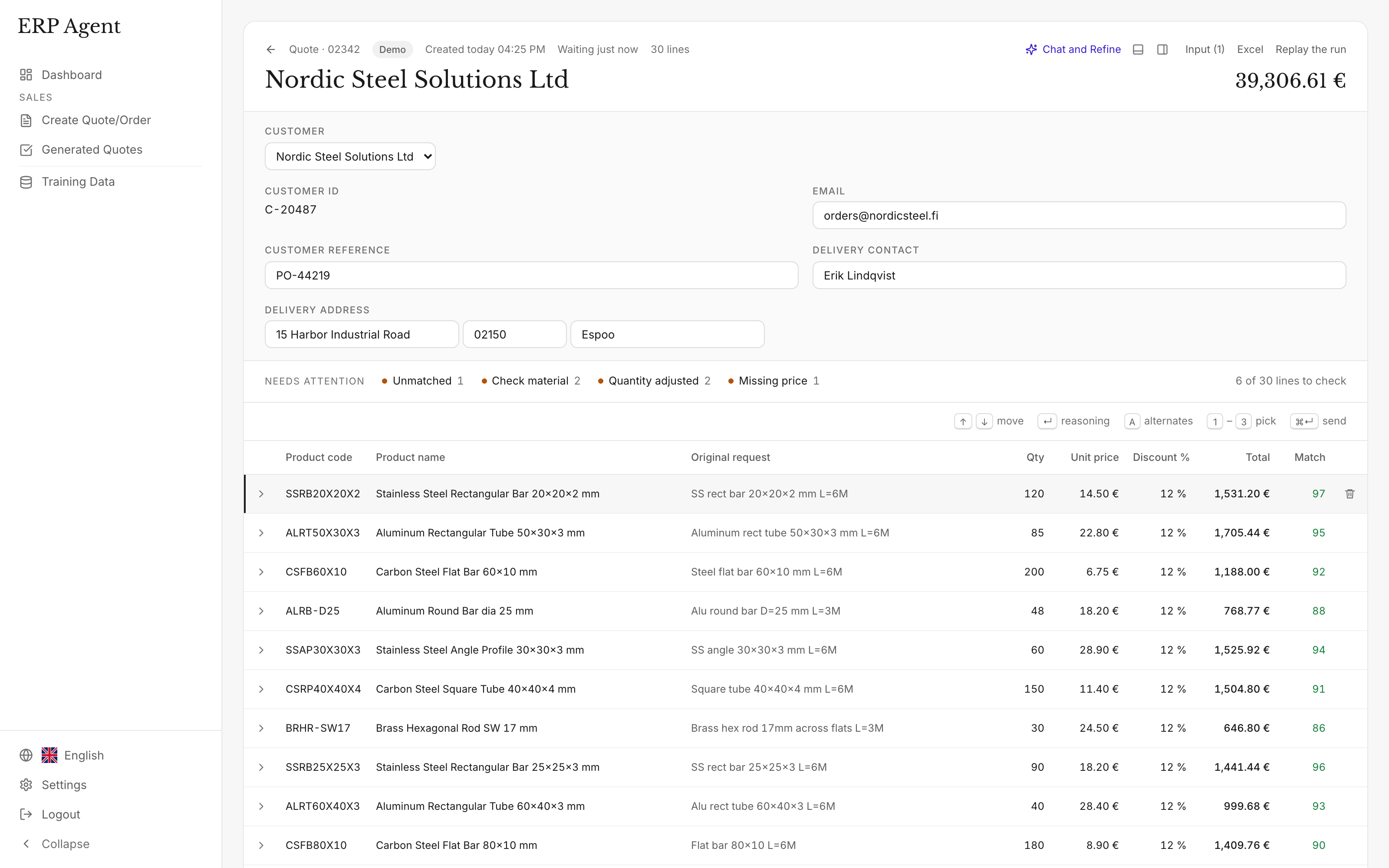
Lines appear in the review table as soon as the agent has matched them.
The enquiry arrives
A rep forwards the email to your company’s own agent mailbox or drops the files into the web app. PDF (scanned too), Excel, CSV, Word, images and forwarded emails are read as they are. See email to ERP.
Customer and site
The agent identifies the customer from the request, finds them in your ERP’s customer register and flags it straight away if no customer matches. A delivery address that differs from the one on file, such as a new site, is flagged too.
Lines to articles
Wording your team confirmed before gets the same article again. Other lines are searched by code, size and description; with sales history, the glove or boot this customer actually buys comes forward.
Checks
Stated sizes and protection classes are checked against each candidate, and a second check you can switch on sends wrong matches back for another search. The agent never guesses: a line it cannot place, such as garments with the customer’s logo, goes on your placeholder code with the customer’s original line kept beside it.
Pricing and approval
Customer pricing comes from the data and rules configured for your company; once your ERP is connected, from its own price logic, customer discounts included. Once the rep approves, the quote or sales order is written to your ERP, CRM or other system.
Example: a new-starter list, line by line
Prices are left out; in a real draft they come from the pricing configured for your company.
Site manager’s email: “40 new starters on the 3rd. Please quote the below, usual terms.”
- Cut D gloves size 9 x 120 pairs
- S3 boots black size 43 x 12
- FFP3 valved masks x 20 boxes
- Hi-vis jacket class 3 orange XL x 15
- Hard hat white vented x 40
- Our code PPE-0331 x 40
- Polo shirts with our logo, sizes to follow x 80
| Request line | Proposed product | Qty | Score | Why |
|---|---|---|---|---|
| Cut D gloves size 9 | 810-4509 Cut-resistant glove, cut level D, size 9 | 120 | 94 | Level and size as written; level C version pushed down |
| S3 boots black size 43 | 720-3043 Safety boot S3, black, size 43 | 12 | 92 | The S3 boot this customer buys |
| FFP3 valved masks | 640-0310 Respirator FFP3, valved, box of 10 | 20 | 88 | Box size not stated; the box of 20 is kept as an alternative |
| Hi-vis jacket class 3 orange XL | 530-3207 Hi-vis jacket class 3, orange, XL | 15 | 95 | Class, colour and size match |
| Hard hat white vented | 610-0102 Safety helmet, white, vented | 40 | 78 | Two vented white helmets fit; marked for review |
| Our code PPE-0331 | 650-0031 Safety glasses, clear lens, anti-fog | 40 | 98 | The site’s own code, learned from an earlier quote |
| Polo shirts with our logo, sizes to follow | Placeholder code, customer’s line kept | 80 | 0 | Branded and sizes missing; marked for the rep to quote |
Illustrative example: the request, article numbers and scores show how each kind of line is handled.
What the rep sees before anything is sent
- The customer’s line beside the proposed article, so the rep checks instead of searching.
- A match score from 0 to 100; lines under 80 are marked (how the match score works).
- Reasoning and alternatives: read why an article was chosen, or take a runner-up such as the other box size.
- Quote chat: add or remove rows and change quantities and prices, each edit approved or rejected line by line.
- A person approves. The agent never sends anything to a customer on its own, and product codes are checked against the ERP first, so only codes that exist there are saved.
How does AI help a PPE and workwear distributor?
Most of a PPE quote is finding the right article among near-identical ones and pricing it for that customer. ERP Agent takes on that work and learns from the lines your team sends: the next time a site writes the same thing, it picks the same article. Buyers get their price sooner, inside sales gets time back for advice on the right protection, and new reps work from what colleagues confirmed.
The protection class on the line is treated as a requirement. When a line says S3, FFP3 or cut level D, articles in a lower class are pushed down, and when the line leaves something open, the rep sees it marked instead of finding out after delivery.
ERP Agent is live with steel, HVAC and fastener distributors. For mixed maintenance lists, see industrial supplies and MRO distributors; to test it on your own enquiries, use the AI quote agent pilot checklist.
Which ERP systems does it work with?
ERP Agent integrates with Business Central, SAP, NetSuite, Visma, IFS, Sage and any other ERP or CRM, and approved quotes and orders land in your ERP, CRM or other system. We set up the connection for your company during onboarding, and you can start with a catalogue file the same week. See how each connection works.
| System | Type | Reads | Writes |
|---|---|---|---|
| Dynamics 365 Business Central | ERP integration | Items, customers, customer prices | Sales quotes and sales orders |
| SAP S/4HANA | ERP integration | Products, business partners, customer prices | Sales quotations and sales orders |
| SAP Business One | ERP integration | Items, business partners, price lists | Sales quotations and sales orders |
| NetSuite | ERP integration | Items, customers, customer prices | Estimates (quotes) and sales orders |
| Dynamics 365 Finance & Supply Chain | ERP integration | Released products, customers, trade agreement prices | Sales quotations and sales orders |
| Visma | ERP integration | Items, customers, customer prices | Quotes and sales orders |
| IFS | ERP integration | Sales parts, customers, customer prices | Sales quotations and customer orders |
| Monitor ERP | ERP integration | Parts, customers, customer prices | Quotes and customer orders |
| Infor M3 | ERP integration | Items, customers, customer prices | Quotations and customer orders |
| Exact | ERP integration | Items, customers, sales prices | Quotations and sales orders |
| AFAS Profit | ERP integration | Items, debtors, price agreements | Quotes and sales orders |
| Odoo | ERP integration | Products, customers, pricelists | Quotations and sales orders |
| Sage | ERP integration | Items, customers, customer prices | Sales quotes and sales orders |
| Epicor Prophet 21 | ERP integration | Items, customers, customer prices | Quotes and sales orders |
| Epicor Eclipse | ERP integration | Items, customers, customer prices | Bids and sales orders |
| Epicor Kinetic | ERP integration | Parts, customers, price lists | Quotes and sales orders |
| Acumatica | ERP integration | Items, customers, customer prices | Quotes and sales orders |
| Infor CloudSuite Distribution | ERP integration | Items, customers, customer prices | Quotes and sales orders |
| Kerridge K8 / Klipboard ERP One | ERP integration | Items, customers, customer prices | Quotes and sales orders |
| Intact iQ / GenetiQ | ERP integration | Items, customers, customer prices | Quotes and sales orders |
| Dynamics NAV | ERP integration | Items, customers, customer prices | Sales quotes and sales orders |
| SAP ECC | ERP integration | Materials, customers, customer prices | Sales quotations and sales orders |
| Jeeves | ERP integration | Items, customers, customer prices | Quotes and sales orders; confirmed values on purchase orders |
| Lemonsoft | ERP integration | Items, customers, customer prices | Quotes |
| Microsoft 365 / Outlook | Email integration | Customer requests in the agent mailbox; email history for training | Nothing is sent to customers without your team |
| Catalogue file / SFTP | File | Product catalogue from a file, from the first week | The reviewed quote or order as a file, ready to import into your system |
| Any other ERP or CRM | ERP or CRM integration | Products, customers and prices, through the connection we set up for your company during onboarding | Quotes and sales orders |
ERP Agent in numbers
- 4–7 min
- per line when a sales rep creates quotes and orders by hand, according to our case study
- Over 95%
- average automation across our customers
- 3–8 min
- for the agent to prepare a typical request
- 0–100
- match score on every line; under 80 is marked for review
Built to fit how a PPE distributor already works
ERP Agent is the first agentic AI layer for wholesale distribution ERP systems. That design is what makes it quick to adopt:
- No ERP replacement project. ERP Agent works on top of the ERP, CRM or other system you already run, and approved quotes and orders land there.
- Your team stays in control. The agent prepares the draft and a rep approves it. Nothing reaches a customer without your team.
- Start with a catalogue file. Load your catalogue, forward real enquiries the same week and connect your ERP when you are ready.
- Nothing to map per customer. ERP Agent identifies the articles from the customer’s own words, so a site that emails for the first time is handled like your largest account.
- EDI, webshop and email side by side. Accounts that order through EDI or your webshop keep doing so; ERP Agent handles the emails, PDFs and spreadsheets.
- It gets better with every quote. Each line your team sends teaches the agent your customers’ wording and item codes.
Related trades and workflows
The same workflow for other trades: industrial supplies and MRO, fastener distributors, cutting tool distributors and electrical wholesalers. For customer purchase orders, see order entry automation.
Frequently asked questions
What is quote automation for PPE and workwear distributors?
Software that turns a customer’s enquiry into a draft quote from your own catalogue: each line matched to the right article by size, colour and protection class, customer pricing applied and the lines to check marked. A rep reviews the draft before it lands in your ERP, CRM or other system.
Does it check the protection class a line asks for?
Yes. A class stated on the line, such as S3, FFP3 or a glove cut level, is checked against every candidate, and articles that contradict it are pushed down. Each line shows a match score from 0 to 100 and the agent’s reasoning, and lines under 80 are marked.
Can it handle sizes and colours?
Yes. The size and colour written on the line are read with the rest of the description and compared with each article, so the size 43 boot and the size 44 boot are told apart by the numbers on the line. Close variants are kept as alternatives the rep can take.
What happens with branded or embroidered workwear?
A line the agent cannot place in your catalogue, such as garments with the customer’s logo or a line with sizes still to follow, goes on your placeholder code with the customer’s wording kept. The rep sees at once which lines need a decision.
Does it learn each customer’s own item codes and usual articles?
Yes. It learns a customer’s codes from the quote history you provide and the lines your team sends, and with sales history the articles that customer actually buys come forward. See customer part numbers.
Does ERP Agent work with our ERP?
Yes. ERP Agent integrates with Business Central, SAP, NetSuite, Visma, IFS, Sage and any other ERP or CRM, including industry-specific packages. We set up the connection for your company during onboarding, and you can start with a catalogue file the same week. See ERP and email integrations.
How long does a large starter-pack list take?
A typical request takes 3–8 minutes, and lines appear in the table as they are matched. Fast mode handles requests of up to about 50 lines in 1–3 minutes, and a list of several hundred lines takes about half an hour.
Related
- AI quote automation for distributors and wholesalers
- RFQ automation for distributors and industrial suppliers
- Order entry automation for distributors: customer POs to sales orders
- Purchase order to sales order automation for wholesale distributors
- Industrial supplies distributor quote automation: from MRO enquiry to reviewed quote
- Fastener quoting software: from customer shorthand to a reviewed quote
Let’s look at your quote workflow
Bring a real PPE enquiry
Book a 30-minute call and bring a list your team found slow to quote.
- Your requests and product catalogue
- Your pricing and review process
- A clear scope for the next step

Lauri Pelkonen
Founder & CEO
Book a 30-minute call Request a demo by emailOr use the address directly