Integration · Kerridge K8 / Klipboard ERP One
AI quote and order automation for Kerridge K8, now Klipboard ERP One
ERP Agent reads the customer’s enquiry from email, PDF or Excel, identifies the right products in your K8 product data, prices each line with that customer’s own pricing and terms and creates a quotation or sales order in K8, now Klipboard ERP One, once your team has approved it. We set up the connection for your company during onboarding.
K8 is now ERP One: what that means for this integration
Kerridge Commercial Systems rebranded as Klipboard in March 2025, and its flagship ERP, K8, was renamed ERP One. Klipboard describes ERP One as the direct continuation of K8, built on the same architecture. So this page applies whether your team still says K8 or already says ERP One, and it uses both names.
What ERP Agent reads from K8 / ERP One
Klipboard’s own pages refer to established product APIs and web services for its ERP products, and to a webhooks platform its customers use to connect other systems. The connection for your company runs through that layer, and which interface it uses is settled for your ERP One environment during onboarding. ERP Agent works from your product data as it is today.
| Data in ERP One | What ERP Agent does with it |
|---|---|
| Products | Identifies the right product for every enquiry line from the customer’s own wording, and checks each product code exists before anything is written |
| Customer accounts | Finds the customer behind the enquiry, warns the rep when no account matches and flags a delivery address that differs from the one in ERP One |
| Customer-specific pricing and terms | Brings in the price ERP One sets for that customer, so the rep reviews the draft with real prices |
Your products, pricing, terms and customer accounts stay exactly as they are: the agent reads them and never changes them.
What ERP Agent writes to K8 / ERP One
Two documents, both written only after a member of your team has approved the draft.
| Document | What is written |
|---|---|
| Quotation | The customer, the customer’s reference and every approved line with product, quantity and the price ERP One sets for that customer, or the price your rep set in review |
| Sales order | The same lines, plus the customer’s order number and the delivery address taken from the enquiry |
Both are ordinary ERP One documents your branches open and edit like any other. When a customer accepts a quotation, your team turns it into an order as usual.
Why merchants on K8 add an AI quote agent
The hard part of a quote is reading “6x2 C24 4.8”, “150 twinwall 6m” or a builder’s own code and knowing which of your products that is, what this account pays for it and which lines need a second look. According to our case study, a sales rep spends on average 4–7 minutes per line when creating quotes and orders by hand; for a 30-line enquiry, that is two to three and a half hours.
ERP Agent does that groundwork. It is the first agentic AI layer for wholesale distribution ERP systems, and on ERP One it works on top of the system you already run: no replacement project, and nothing changes for your customers. Builders and contractors get answers sooner, and your branch teams spend their time on customers instead of retyping lists. Put a number on today’s manual work with the quote cost calculator.
The same agent runs quote automation and order entry automation on any ERP; this page covers what it does with K8 and ERP One. For the trade itself, see builders’ merchants.
How K8 quote automation works
An enquiry reaches the agent
Branch staff forward the customer’s email from Outlook to your company’s own agent mailbox, or paste it into the web app as it is and choose quote or sales order. PDF (scanned too), Excel, CSV, Word, images and forwarded emails all work. Your own systems can send enquiries through the REST API or the MCP server.
It finds the customer and the products
The customer is identified from the enquiry and matched to an account in ERP One. Trade shorthand, sizes, materials, manufacturer numbers and customers’ own codes are mapped to your products, and candidates that contradict a stated size, length or rating class are pushed down. A line too vague to identify goes on your placeholder product with the customer’s wording kept, never a guess.
Prices come from ERP One
Each line carries the price ERP One gives that customer, from the pricing and terms on the account. Standard charge lines, such as packing, are added following your rules.
A rep reviews the draft
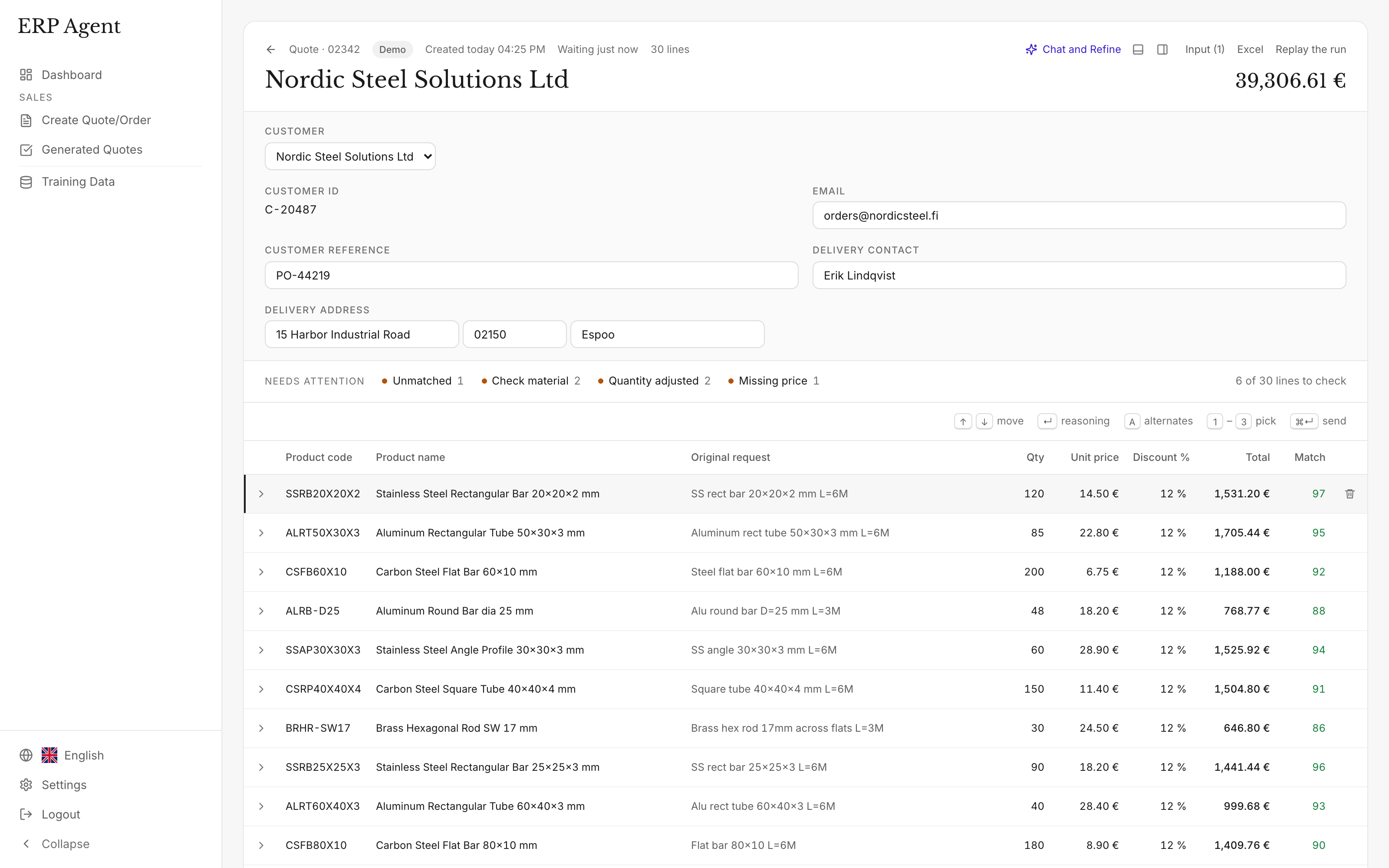
Lines appear in the table as they are matched. The rep checks the marked ones, takes an alternative where needed, makes changes in quote chat and approves.
It is created in ERP One
Every product code is checked against ERP One first, so a document never carries a code the system doesn’t know. A short countdown lets the rep cancel. The lines your team sends teach the agent: the next time a customer writes the same thing, it picks the same product.
Example: a groundworker’s enquiry becomes a K8 quotation
A groundworks contractor emails a list to a builders’ merchant running ERP One. The branch forwards it to the agent mailbox, which is set to create quotations.
“Can you price these for the Mill Lane plots, delivery to site next week.”
- A142 mesh 4.8x2.4 x 12
- 1200g DPM 4x25 x 3
- 150 twinwall 6m x 10
- 10mm pea shingle bulk bag x 6
- 450 dia manhole cover for driveway x 2
- Your code 104522 x 20
- Kerbs to match existing x 40
| Enquiry line | Proposed ERP One product | Qty | Match | Note |
|---|---|---|---|---|
| A142 mesh 4.8x2.4 | Reinforcement mesh A142, 4.8 × 2.4 m sheet | 12 | 97 | Mesh type and sheet size match; A193 and A252 pushed down. |
| 1200g DPM 4x25 | Damp-proof membrane 1200 gauge, 4 × 25 m roll | 3 | 95 | Gauge and roll size match. |
| 150 twinwall 6m | Twinwall drainage pipe 150 mm, 6 m, unperforated | 10 | 76 | Perforated or unperforated not stated; marked, with the perforated pipe as the alternative. |
| 10mm pea shingle bulk bag | Pea shingle 10 mm, bulk bag | 6 | 93 | Bulk bag, not the 25 kg bag. |
| 450 dia manhole cover for driveway | Manhole cover and frame 450 mm, B125 | 2 | 72 | Load class not stated; B125 proposed for a driveway and marked for the rep to confirm. |
| Your code 104522 | Concrete padstone 440 × 215 × 140 mm | 20 | 99 | Your own product code, found directly. |
| Kerbs to match existing | Placeholder product, wording kept | 40 | – | Too vague to identify; the rep decides. |
Illustrative example with sample products, codes and scores. In a real draft each line also carries the customer’s price from ERP One.
What the rep sees before anything reaches K8
- A match score from 0 to 100. Lines under 80 are marked, so review starts where judgement is needed. How the match score works.
- Reasoning. Open a line to see why the agent chose that product.
- Alternatives. Runner-up products are kept on the line; take one instead.
- Quote chat. Add or remove rows or change quantities and prices, then approve or reject each proposed edit line by line.
- Your team stays in control. A member of your team approves the draft before it is created in ERP One, and nothing reaches a customer without approval.
Security and control
- GDPR-compliant, zero data retention. ERP Agent is GDPR-compliant, and models run with zero data retention. More on security and data handling.
- Access agreed first. Before setup, we agree which data the agent needs and which systems it can access.
- Only the access the work needs. We agree with you which ERP One data the connection may read and which documents it may create: products, customer accounts and pricing in, quotations and sales orders out.
- A person approves. Nothing is written to ERP One until a member of your team approves the draft, and nothing reaches a customer without your team.
- Reads, never rewrites. Products, prices and customer accounts are read; the agent creates quotations and sales orders and changes nothing else.
Onboarding: what we need from you
We set up the K8 / ERP One connection for your company during onboarding. Your branches don’t wait for it: they start with a catalogue file the same week.
A catalogue export
An export of your products from K8 or ERP One, for example to Excel or CSV. Branches forward real enquiries from the first week, reviewing every draft in the web app. See starting from a catalogue file.
Access for the connection
Access to ERP One’s APIs or web services for your environment, arranged under your own Klipboard licence, with the scope we agree: products, customer accounts and pricing to read, quotations and sales orders to create.
Your rules and history
Which placeholder product takes lines too vague to identify, which charge lines the agent adds, and past quotations or Outlook email history, so the agent learns how your customers write.
Live in ERP One
Customer prices now come from ERP One, and approved quotations and sales orders are created there directly.
ERP Agent in numbers
- 4–7 min
- per line to create quotes and orders by hand, according to our case study
- Over 95%
- average automation across our customers
- 3–8 min
- for the agent to prepare a typical request
- 1–3 min
- in fast mode, for requests of up to about 50 lines
K8 today, any ERP tomorrow
ERP Agent integrates with Kerridge K8 / Klipboard ERP One, Intact iQ, Sage, Business Central and any other ERP or CRM. We set up the connection for your company during onboarding, and you can start with a catalogue file the same week. Group companies on different systems use the same agent and the same review screen on each. See Intact iQ, Sage 200, Business Central and all integrations.
ERP Agent is live with steel, HVAC and fastener distributors. What it checks on each line follows your trade: sizes, grades and lengths for builders’ merchants and timber merchants, pipe sizes and fitting types for plumbers’ merchants, cable sizes and IP ratings for electrical wholesalers.
Frequently asked questions
Does ERP Agent work with Kerridge K8?
Yes. ERP Agent integrates with Kerridge K8, which Klipboard now calls ERP One. It reads products, customer accounts and customer pricing and creates quotations and sales orders after a member of your team approves. We set up the connection for your company during onboarding, and you can start with a catalogue file the same week.
Is K8 the same system as Klipboard ERP One?
Yes. Kerridge Commercial Systems rebranded as Klipboard in March 2025 and renamed K8 to ERP One. Klipboard describes ERP One as the direct continuation of K8 on the same architecture, so the integration is the same under either name.
Does it create quotations or sales orders in K8?
Both. In the web app the rep chooses quote or sales order for each enquiry; emails forwarded to the agent mailbox become the document type your company has chosen. For customer purchase orders arriving by email, see purchase order to sales order automation.
Does ERP Agent replace Klipboard AI?
No, it adds a dedicated quote and order agent alongside it. Klipboard AI is built into ERP One for the questions and tasks a user asks for inside the ERP. ERP Agent starts from the customer’s own email, list or schedule: it identifies the right products from trade shorthand and customers’ own codes in enquiries of several hundred lines, scores every line from 0 to 100 with its reasoning and alternatives, and learns from the lines your team sends.
What does ERP Agent need access to in ERP One?
Read access to products, customer accounts and customer pricing, and permission to create quotations and sales orders. We agree the scope with you before setup, and the access itself is arranged under your own Klipboard licence.
Does it work with Klipboard’s other ERP products?
This page covers ERP One, the system known as K8. ERP Agent integrates with any ERP or CRM, Klipboard’s other ERP products included, and we set up the connection for your company during onboarding.
How do we get started?
Book a call and bring a few real enquiries. You start with a catalogue file the same week, and we set up the K8 / ERP One connection during onboarding. Pricing is a setup fee plus a monthly subscription, with an itemised quote before you start. See pricing.
Related
- AI quote automation for distributors and wholesalers
- Order entry automation for distributors: customer POs to sales orders
- ERP integrations for AI quote and order automation, on any ERP system
- Builders’ merchant quote automation: from a site list or QS schedule to a priced quote
- Lumber distributor quote automation: from a builder’s list to a reviewed quote
- Plumbing supply quote automation for merchants and PVF distributors
Let’s look at your quote workflow
Bring an enquiry from your branch inbox
Book a 30-minute call with a few real enquiries; we’ll show how the agent handles them with your products and what connecting your K8 or ERP One involves.
- Your requests and product catalogue
- Your pricing and review process
- A clear scope for the next step

Lauri Pelkonen
Founder & CEO
Book a 30-minute call Request a demo by emailOr use the address directly