On this page
Three differences you can check before you choose
- Real requests the same week. Proton’s home page promises “Go live in weeks”. Its integration page says a full platform rollout can take 12 to 16 weeks, including integration, configuration, testing and training, and that a single module can move faster. ERP Agent starts from a catalogue file, the product file you export today. Your company gets its own agent mailbox, reps forward real requests in the first week, and we set up the connection to your ERP during onboarding. Your IT team does not have to open ERP access before your sales team sees what the agent proposes.
- Count the lines that come back right. Proton’s product page reports the first-try part matches from one distributor’s evaluation: 85% matched without rep edits. At LVI-WaBeK, ERP Agent automates quote lines with over 95% accuracy, and our customers average over 95% automation. The number that settles it is your own: a pilot runs your real requests against your own catalogue, and you count the lines that come back as the product your rep would have chosen.
- One job on top of your ERP, not a module of a wider platform. Proton’s launch post says point tools “attack one slice of the job” and that it built Order & Quote Entry Automation “as part of a platform architecture instead”: CRM, PIM, eCommerce AI and Order & Quote Entry Automation on one shared data layer. ERP Agent takes the other view. It does one job thoroughly, on top of the ERP, CRM or other system you already run: it turns the customer’s request into a priced quote or sales order. Keep the CRM you have. Every line carries a match score from 0 to 100 with the agent’s reasoning, and the monthly price is set by your line volume alone, with unlimited users.
Proton vs ERP Agent, side by side
The Proton column uses Proton’s own home page, integration page and Quote & Order Entry Automation page.
| Proton | ERP Agent | |
|---|---|---|
| First real request processed | “Go live in weeks”; a full platform rollout can take 12 to 16 weeks, and a single module can move faster | The same week, from the catalogue file you export today, while the ERP connection is set up during onboarding |
| The accuracy figure each vendor publishes | 85% first-try part matches, matched without rep edits, in one distributor’s evaluation | Over 95% accuracy in quote-line automation at LVI-WaBeK; customers average over 95% automation |
| You want the quote desk automated and nothing else changed | One of four modules, built “as part of a platform architecture” on a data layer shared with CRM, PIM and eCommerce AI; sold on its own or with the others | One job on top of the ERP you already run: the request becomes a priced quote or sales order |
What your rep does with a 40-line request in ERP Agent
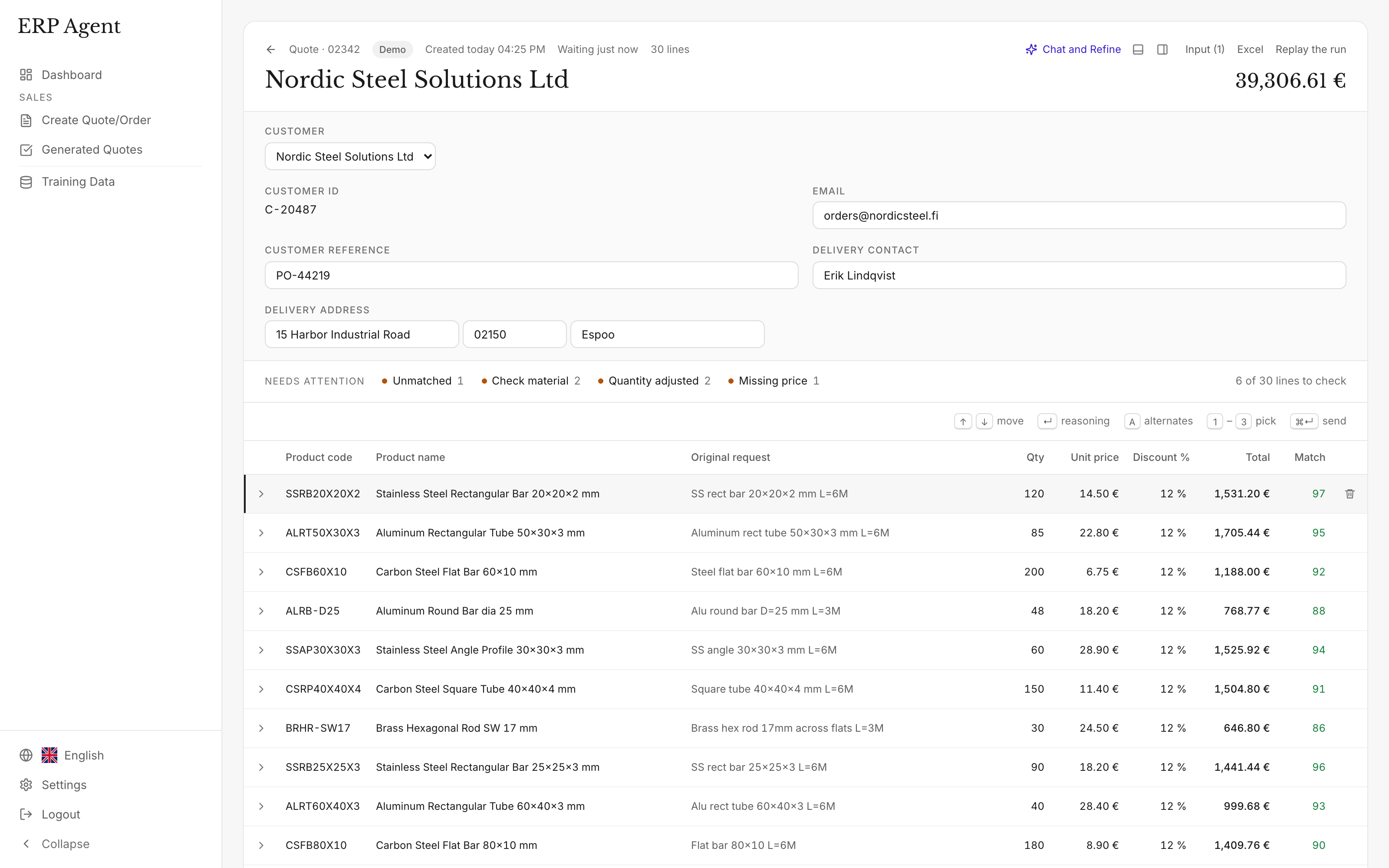
All of this happens in one review screen, and every step works from the keyboard.
The draft fills in while you watch
Lines appear in the table as the agent matches them. Requests with several hundred lines are split into batches that run in parallel.
Go straight to the marked lines
Every line carries a match score and the agent’s reasoning. Press N to jump to the next line under 80. The customer’s original wording sits next to the proposed product.
Swap with one key
When more than one product could fit, the line already holds up to three runner-ups from your catalogue, each with its own match score, unit price and line total. Press 1, 2 or 3 to take one, 0 to go back to the agent’s pick, or A to search that line again.
Change the rest by typing
In quote chat, type “line 5 should be the three-phase motor, and add 2 B54 belts”. The agent searches your catalogue and shows each change as before and after, such as “#5 unit price $184.00 → $197.50”. Keep or reject each one. The chat cannot send anything.
Send, and it learns
Send to your ERP with “Final — send and learn”. The next time a customer writes the same thing, the agent picks the same product. Nobody writes a rule.
Example: a maintenance request in the customer’s own words
A maintenance planner emails an industrial supplies distributor. Prices are left out here; in a real draft they come from the customer’s terms in your ERP.
“Morning, need a price on these for the Line 3 shutdown. Thanks”
- 4 x 6205 2RS C3
- 2 x B52 v-belt
- 10 boxes nitrile gloves L 5mil
- 6 x Brandex BX-4471 or equal
- 1 x 3/4 hp motor 56C 1800rpm
| Request line | Proposed product | Qty | Match | Note |
|---|---|---|---|---|
| 6205 2RS C3 | Deep groove ball bearing 6205-2RS, C3 clearance | 4 | 97 | Seals and clearance read from the suffixes; the shielded ZZ bearing was pushed down. |
| B52 v-belt | Classical V-belt, B section, B52 | 2 | 95 | Section and length read from the belt number. |
| nitrile gloves L 5mil | Nitrile disposable gloves, size L, 5 mil, box of 100 | 10 | 93 | Size and thickness match; quantity kept in boxes. |
| Brandex BX-4471 or equal | Cam and groove coupling type C, 2 in, aluminium | 6 | 86 | Another brand’s code, mapped through your cross-reference data. |
| 3/4 hp motor 56C 1800rpm | Electric motor 3/4 hp, 56C frame, 1,800 rpm, single-phase | 1 | 71 | Marked: voltage and phase not stated. The three-phase motor is alternative 1, one keypress away. |
Illustrative example with sample products, codes, a made-up brand and scores, showing how a draft is presented for review.
Why the product decision is the part that matters
A quote request comes down to one decision per line: which of your products the customer means when he writes shorthand, quotes another brand’s code or uses his own article number. According to our case study, a sales rep spends on average 4–7 minutes per line when creating quotes and orders by hand (calculate your cost).
ERP Agent is built around that decision. It makes it for every line, shows how sure it is, and leaves your rep a one-key fix when it is wrong. Because it does this one job on top of the ERP, CRM or other system you already run, the quote desk gets its time back without a wider platform to adopt. See how ERP Agent automates quotes and order entry.
How to test it on your own requests
You can run ERP Agent on real requests before any integration work begins.
Send your catalogue
The product file you export today is enough to start; past quotes help it learn faster. From the first request, the products proposed are your own.
Forward real requests
Your company gets its own agent mailbox. Reps forward customer requests there or paste them into the web app, and a typical request is ready for review in 3–8 minutes.
Count the lines that come back right
Include the difficult requests: description-only lists, other brands’ codes, scans and shorthand. Our pilot checklist shows how to set up a fair trial.
Connect your ERP
We set up the connection to your ERP or CRM during onboarding. Reviewed quotes and orders then land in the system your team already uses.
ERP Agent in numbers
- 4–7 min
- per line when quotes and orders are created by hand, according to our case study
- Over 95%
- average automation across our customers
- Over 95%
- accuracy in quote-line automation at LVI-WaBeK
- 3–8 min
- for the agent to prepare a typical request
ERP Agent is live with steel, HVAC and fastener distributors. Read how LVI-WaBeK turns customer requests into quote lines with the right products and prices.