On this page
Three differences you can check before you choose
- The draft is ready before your rep opens it. Plato’s HVAC and sanitary page describes a project list of dozens of line items this way: “your team searches by product name, article number or spec” and “builds the quote in one screen”. With ERP Agent, your rep forwards the customer’s email to your company’s agent mailbox. The agent reads the body and every attachment, PDF (scanned too), Excel, CSV, Word and images, and prepares the whole draft. A typical request is ready for review in 3–8 minutes, and a request of several hundred lines in about half an hour.
- A line with no article number is the normal case. Plato’s site describes “intelligent product search by name, article number or spec”, and its HVAC and sanitary page says “reps search by product name, article number, or technical spec”. ERP Agent does that search for every line of the request. It reads “spiral 250 3m galv” as a Ø250 spiral duct, 3,000 mm, galvanised, and finds it in your catalogue. It also checks what the line states: when it says EI60, 230 V or DN50, products rated EI30, 24 V or DN40 drop down the list. Every line carries a match score and the agent’s reasoning, and lines under 80 are marked.
- Real requests the same week. Plato’s ERP integration page answers “How long does the ERP connection take to set up?” with “Typically 2-6 weeks, depending on your ERP system and data complexity.” ERP Agent starts from a catalogue file. Your reps forward real requests the same week, while we set up the connection to Business Central, SAP, NetSuite or your other ERP during onboarding.
Plato vs ERP Agent, side by side
The Plato column uses Plato’s own sales automation, HVAC and sanitary, and ERP integration pages.
| Plato | ERP Agent | |
|---|---|---|
| A customer emails a 40-line project list as a PDF | “Your team searches by product name, article number or spec” and “builds the quote in one screen” | Reads the email and every attachment and prepares the whole draft; your rep checks the marked lines |
| The line says “spiral 250 3m galv” and has no article number | “Reps search by product name, article number, or technical spec” | Finds the product from size, length and finish, checks the stated attributes and scores the match 0–100 |
| Before your reps can use it on real requests | Setting up the ERP connection: “Typically 2-6 weeks, depending on your ERP system and data complexity” | A catalogue file is enough: real requests the same week, while the ERP connection is set up |
What your rep does with a 40-line request in ERP Agent
Nobody searches for forty products. The rep starts from a finished draft, and every step works from the keyboard.
Forward the email
The rep forwards the customer’s request to your agent mailbox or pastes it into the web app. Lines appear in the table as the agent matches them, and requests with several hundred lines are split into batches that run in parallel.
Go straight to the marked lines
Press N to jump to the next line under 80. The customer’s original wording sits next to the proposed product, with the agent’s reason for choosing it.
Swap with one key
When more than one product could fit, the line already holds up to three runner-ups from your catalogue, each with its own match score, unit price and line total. Press 1, 2 or 3 to take one, 0 to go back to the agent’s pick, or A to search that line again.
Change the rest by typing
In quote chat, type “line 4 should be the 230 V version, and add 10 wall plugs”. The agent searches your catalogue and shows each change as before and after, such as “#4 unit price 7.49 € → 7.95 €”. Keep or reject each one. The chat cannot send anything.
Send, and it learns
Send to your ERP with “Final — send and learn”. The next time a customer writes the same thing, the agent picks the same product. Nobody writes a rule.
Example: an installer’s project list, drafted from the email
An installer emails an HVAC and sanitary wholesaler a list for a renovation job. Prices are left out; in a real draft they come from the customer’s terms.
“Hi, please quote the attached list for the school renovation, delivery week 3.”
- 14 x spiral 250 3m galv
- 4 x fire damper 250 EI60
- 18 x press elbow 28 cu
- 3 x circulation pump 25-60 180
- 10 x our ref HZ-2210
| Request line | Proposed product | Qty | Match | Note |
|---|---|---|---|---|
| spiral 250 3m galv | Spiral duct Ø250, L=3000 mm, galvanised | 14 | 95 | “Spiral” read as spiral duct, 3m as 3000 mm. |
| fire damper 250 EI60 | Circular fire damper Ø250, EI60 | 4 | 89 | EI30 and EI90 dampers pushed down. |
| press elbow 28 cu | Press elbow 90°, 28 mm, copper | 18 | 93 | “Press” read as press-fit, “cu” as copper. |
| circulation pump 25-60 180 | Circulation pump 25-60, 180 mm | 3 | 76 | Marked. Two pumps share the 25-60 size; the other is alternative 1, one keypress away. |
| our ref HZ-2210 | Thermostatic radiator valve set DN15, straight | 10 | 98 | The customer’s own code, learned from an earlier quote and shown on the line. |
Illustrative example with sample products, codes and scores, showing the draft as it arrives for review.
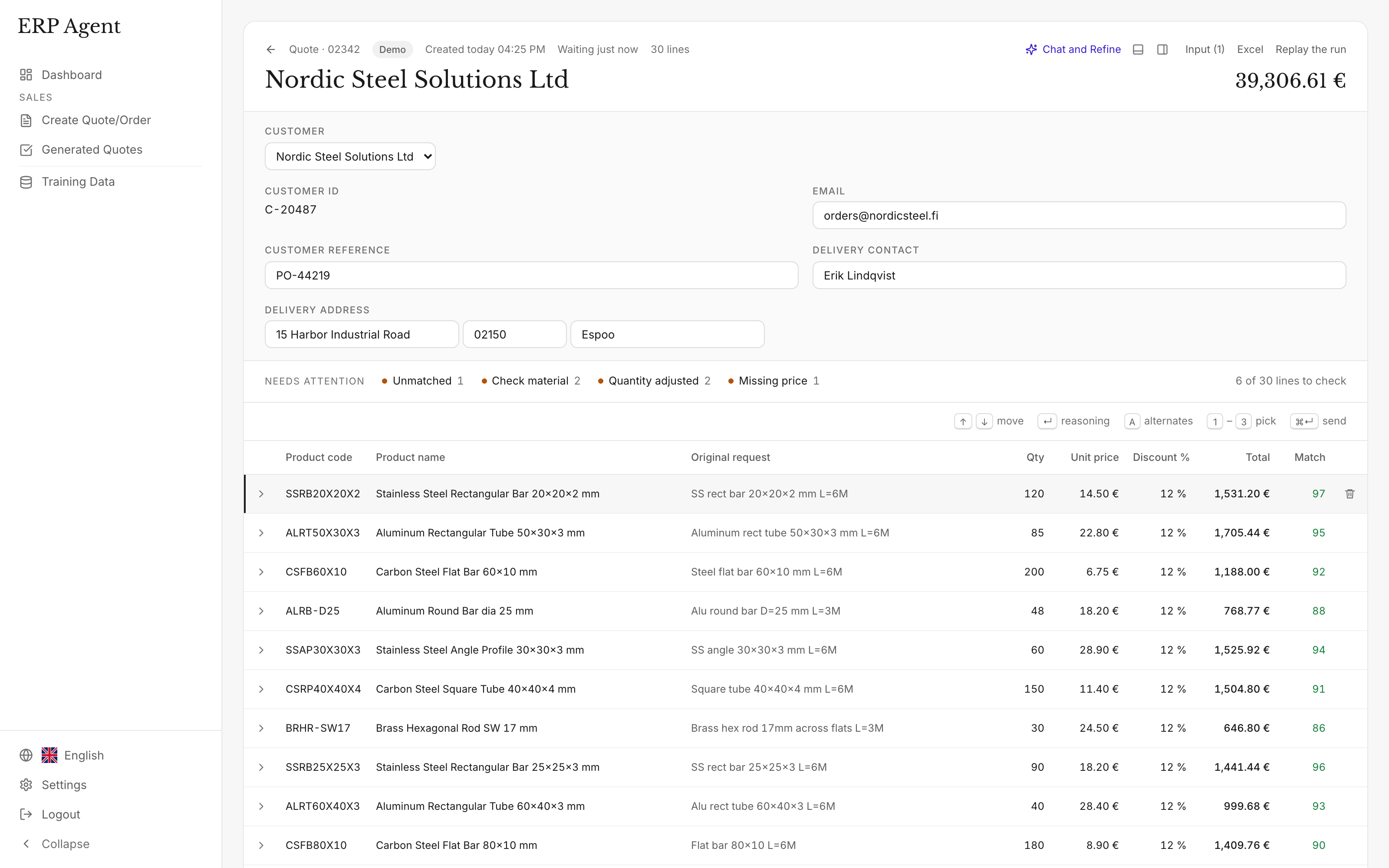
Why the product decision is the part that matters
A faster product search still leaves the searching to your rep. On a 40-line request, the slow part is deciding which of your products each line means when the customer writes shorthand, gives dimensions in their own format or uses their own article number, forty times over. According to our case study, a sales rep spends on average 4–7 minutes per line when creating quotes and orders by hand (calculate your cost).
Plato calls itself “the AI sales platform for distribution” and “the only tool your sales team needs”. A platform asks your whole sales team to move into it. ERP Agent does one job thoroughly, on top of the ERP you already run: it turns the request your customer sent into a priced quote or sales order. Your reps keep their inbox, forward the request and review a finished draft. See how ERP Agent automates quotes.
How to test it on your own requests
You can run ERP Agent on real requests before any integration work begins.
Send your catalogue
A product file is enough to start; past quotes help it learn faster.
Forward real requests
Your company gets its own agent mailbox. Reps forward customer requests there or paste them into the web app, and a typical request is ready for review in 3–8 minutes.
Count the lines that come back right
Include the difficult requests: long project lists, scans and lines with no article number. Our pilot checklist shows how to set up a fair trial.
Connect your ERP
We set up the connection to your ERP or CRM during onboarding. Reviewed quotes and orders then land in the system your team already uses.
ERP Agent in numbers
- 4–7 min
- per line when quotes and orders are created by hand, according to our case study
- Over 95%
- average automation across our customers
- Over 95%
- accuracy in quote-line automation at LVI-WaBeK
- 3–8 min
- for the agent to prepare a typical request
ERP Agent is live with steel, HVAC and fastener distributors. Read how LVI-WaBeK turns customer requests into quote lines with the right products and prices.