On this page
Four differences you can check before you choose
- An article code your system does not know. Lleverage’s Business Central page says each line “is tied to an item, including a customer’s own part number”, and that “an unknown article code goes to a person”. ERP Agent reads the rest of the line. “Ball valve 1" PN16” under a code it has never seen comes back as the DN25 ball valve rated PN16 from your catalogue, and so does the same line with no code at all. It also checks what the line states: the PN10 valve drops down the list, and so does a 24 V product when the line says 230 V. A line it cannot place goes on your placeholder code, marked for the rep.
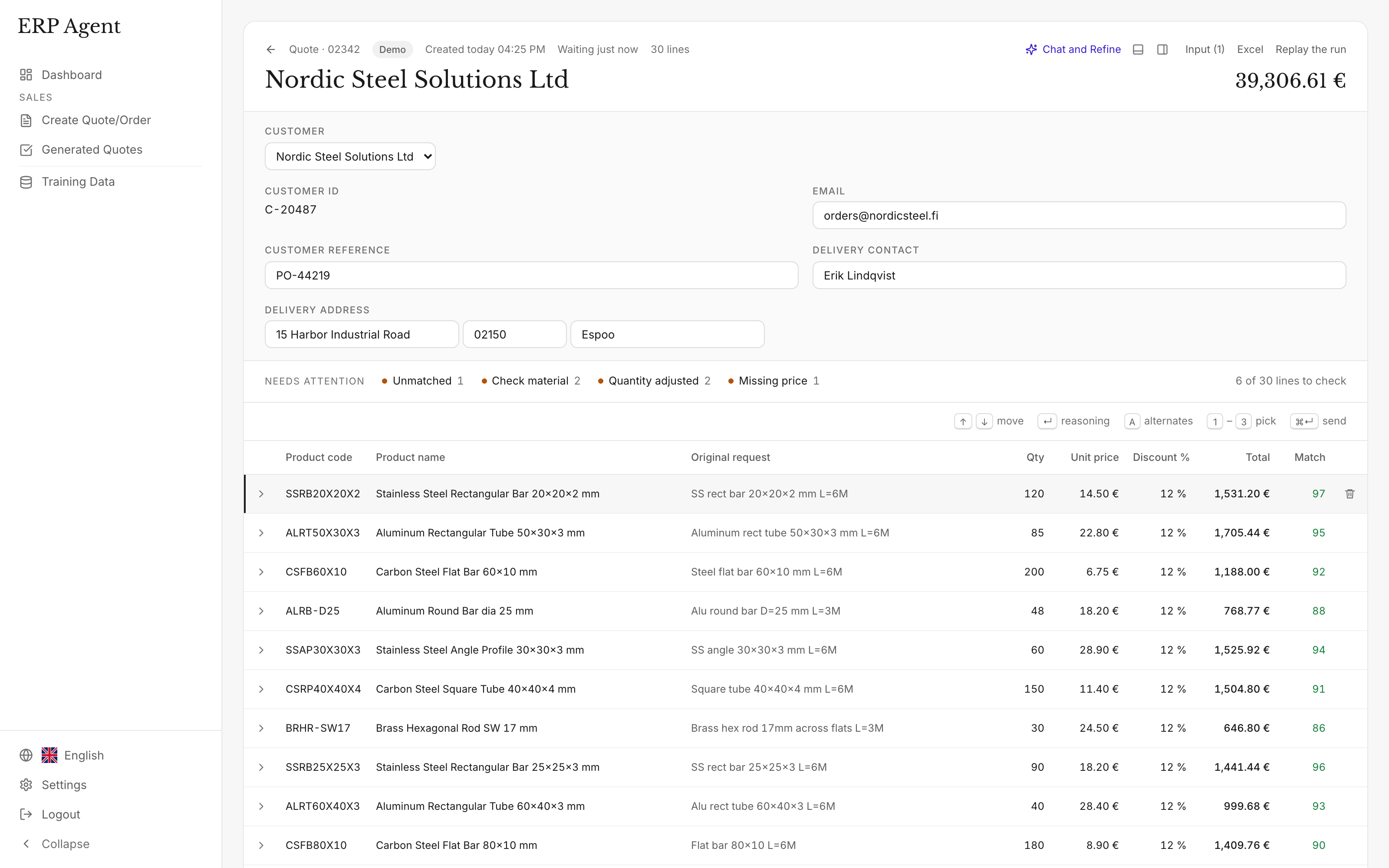
- The unclear line is marked in the draft. Lleverage’s agents page says that when the agent is unsure, “it waits instead of guessing”, and its Business Central comparison says that on “an article code it does not know, the colleague who owns the customer gets the question in Teams with the reason”. In ERP Agent the unclear line is already in the draft your rep is reviewing. It carries a match score, the agent’s reasoning and, where more than one product fits, up to three ranked alternatives with their own score, unit price and line total. Lines under 80 are marked, N jumps to the next one, and 1, 2 or 3 swaps the product.
- Real requests the same week. Lleverage’s pricing page says the first process “typically runs supervised within a few weeks”. ERP Agent starts from a catalogue file. Your reps forward real requests the same week, while we set up the connection to Business Central, SAP, Exact or your other ERP during onboarding.
- One subscription for quotes, tenders and orders. Lleverage’s pricing page says “one monthly price per agent”, counts an agent as “one process, end to end”, and adds: “We price it after we have seen it.” ERP Agent’s monthly price is set by your line volume alone. Quote requests, tenders and sales orders are always included, and you receive an itemised quote before getting started (pricing).
Lleverage vs ERP Agent, side by side
The Lleverage column uses Lleverage’s own order management, Business Central, agents and pricing pages.
| Lleverage | ERP Agent | |
|---|---|---|
| The line carries an article code your system does not know | “An unknown article code goes to a person” | Reads the description on the line: finds the valve from type, size and rating, pushes the PN10 one down and scores the match 0–100 |
| The agent is not sure about a line | “It waits instead of guessing”; on an unknown article code, “the colleague who owns the customer gets the question in Teams with the reason” | The line is marked in the draft with its score, the reason and up to three ranked alternatives; keys 1–3 swap |
| First real request processed | The first process “typically runs supervised within a few weeks” | The same week, from a catalogue file |
| How it is sold | “One monthly price per agent”, an agent being “one process, end to end” | A setup fee and a monthly subscription set by line volume alone; quote requests, tenders and sales orders always included (pricing) |
What your rep does with a 40-line request in ERP Agent
All of this happens in one review screen, and every step works from the keyboard.
The draft fills in while you watch
Lines appear in the table as the agent matches them. Requests with several hundred lines are split into batches that run in parallel.
Go straight to the marked lines
Press N to jump to the next line under 80. The customer’s original wording sits next to the proposed product, with the agent’s reason for choosing it.
Swap with one key
Press 1, 2 or 3 to take a stored alternative, and see the new price and line total at once. Press 0 to go back to the agent’s pick, or A when you want the agent to search that line again.
Change the rest by typing
In quote chat, type “line 4 should be the 230 V version, and add 10 wall plugs”. The agent searches your catalogue and shows each change as before and after, such as “#4 unit price 7.49 € → 7.95 €”. Keep or reject each one. The chat cannot send anything.
Send, and it learns
Send to your ERP with “Final — send and learn”. The next time a customer writes the same thing, the agent picks the same product. Nobody writes a rule.
Example: a request in the customer’s own words
An installer emails a technical wholesaler whose catalogue is in English. In this example flat bar sells by the kilo. Prices are left out; in a real draft they come from the customer’s terms.
“Hi, please quote the below for the pipework supports, delivery next week.”
- 6 x ball valve 1" PN16
- 20 st knie 22 pers koper
- Flat 100x10 S275, 6 off @ 2350
- 40 x pipe clamp 54
- 10 x our ref TW-1187
| Request line | Proposed product | Qty | Match | Note |
|---|---|---|---|---|
| ball valve 1" PN16 | Ball valve DN25 (1"), PN16 | 6 | 91 | The PN10 version contradicts the stated rating and was pushed down. |
| knie 22 pers koper | Press elbow 90°, 22 mm, copper | 20 | 90 | A Dutch request line matched against an English catalogue. |
| Flat 100x10 S275, 6 off @ 2350 | Flat bar 100x10 S275JR | 110.69 kg | 95 | 6 × 2.35 m × 7.85 kg/m. |
| (added) | Sawing service | 6 pcs | 100 | 2350 mm is not a standard length. |
| pipe clamp 54 | Pipe clamp 54 mm, rubber lined | 40 | 77 | Marked. Lined and unlined clamps both fit; the unlined one is alternative 1, one keypress away. |
| our ref TW-1187 | Threaded rod M10 × 1000 mm, zinc plated | 10 | 98 | The customer’s own code, learned from an earlier quote and shown on the line. |
Illustrative example with sample products, codes and scores. The weight per metre is typical; real drafts use your product data.
Why the product decision is the part that matters
Reading the fields off a PDF is the easy half of a quote request. The slow half is deciding which of your products each line means when the customer writes shorthand, gives dimensions in their own format or uses their own article number. According to our case study, a sales rep spends on average 4–7 minutes per line when creating quotes and orders by hand (calculate your cost).
Lleverage’s homepage puts its own scope in one line: “Not one task. Your whole back office.” A platform built to automate many processes asks you to adopt that platform. ERP Agent does one task thoroughly, on top of the ERP you already run: it turns the request your customer sent into a priced quote or sales order. It makes the product decision for every line, shows how sure it is, and leaves your rep a one-key fix when it is wrong. See how ERP Agent automates quotes.
How to test it on your own requests
You can run ERP Agent on real requests before any integration work begins.
Send your catalogue
A product file is enough to start; past quotes help it learn faster.
Forward requests from any customer
Your company gets its own agent mailbox. Reps forward customer requests there or paste them into the web app, and a typical request is ready for review in 3–8 minutes. No customer has to be set up first.
Count the lines that come back right
Include the difficult requests: lines with no article code, customers you have never quoted before and steel given by cut length. Our pilot checklist shows how to set up a fair trial.
Connect your ERP
We set up the connection to your ERP or CRM during onboarding. Reviewed quotes and orders then land in the system your team already uses.
ERP Agent in numbers
- 4–7 min
- per line when quotes and orders are created by hand, according to our case study
- Over 95%
- average automation across our customers
- Over 95%
- accuracy in quote-line automation at LVI-WaBeK
- 3–8 min
- for the agent to prepare a typical request
ERP Agent is live with steel, HVAC and fastener distributors. Read how LVI-WaBeK turns customer requests into quote lines with the right products and prices.